Archives
now browsing by author
Getting Value out of Agile Retrospectives: “Team Assessment Survey”
Hi guys, in this post I will explain how can you use Team Assessment Survey as a tool for a retrospective. On my current job I was exposed to the SAFe framework by Dean Leffingwell, this framework provide a team assessment survey, the exercise that I will teach here is an adaptation of Dean’s assessment. The original assessment can be found here.
This exercise can be found in the book: “Getting Value out of Agile Retrospectives”, a book written by me and Ben Linders with the foreword from Esther Derby. The book can be downloaded by free in LeanPub.com or InfoQ.com, please download it and spread it within your colleagues.
Here you can find my previous blog “Getting Value out of Agile Retrospectives: “Value Stream Mapping”"
What you can expect to get out of this technique
The purpose of this exercise is to analyze how teams are performing in different areas and identify possible improvements to be taken in the near future (next sprint?). The assessment has four main areas:
- Product Ownership Health - How the product owner is performing
- Sprint Health - How activities within the sprint are being managed
- Team Health - How healthy is the team spirit within the team
- Technical Health - How well the team has implemented technical best practices
Each of the areas has different questions that can be rated from zero to five, allowing the team to visualize what are the areas that need more attention from the team.
This is a great exercise to reveal the overall agile health of a team.
When you would use this technique
I believe this technique is quite simple and does not require any special occasion. Although, it might be suitable for situations when a team wants to understand better how well they are implementing Agile. This exercise will not solve specific problems that occured during the sprint, but might reveal some of the causes why those problems happened. For example if the team is finding a lot of bugs during development it might be that their Unit Testing, or automation practices is not being well implemented.
How to do it
To Perform this exercise you just need an excel sheet. Like I said before that excel well have four main areas (Product Ownership Health, Sprint Health, Team Health and Technical Health). For each different areas you create several questions that you think are appropriate for your team. You can always refer the questions from SAFe Team Scrum XP assessment that you can find here. Below I list two questions as an example for each different areas.
Product Ownership Health:
- Product Owner facilitates user story development, prioritization and negotiation
- Product Owner collaborates proactively with Product Management and other stakeholders
Sprint Health:
- Team plans the sprint collaboratively, effectively and efficiently
- Team always has clear sprint goals, in support of PSI (do readers know what PSI is?) objectives, and commits to meeting them
Team Health:
- Team members are self-organized, respect each other, help each other complete sprint goals, manage inter-dependencies and stay in-sync with each other
- Stories are iterated through the sprint with multiple define-build-test cycles (e.g. the sprint is not a waterfalled)
Technical Health:
- Automated acceptance tests and unit tests are part of story DoD
- Refactoring is always underway
All these questions can be rated from zero to five, zero means “Never”, five means “Always”.
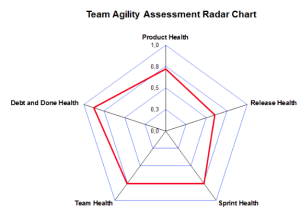 During the retrospective the team just need to fill the excel file as a team and evaluate themselves to see where they stand. If you want, you can create a nice graphic to easily see the result of the assessment. An example can be seen on the picture on the right side.
Visualizing the graphic will give a team a good understanding where they stand, with the graphic in front of them they should decide which area they want to improve, again chose only one area at the time and one topic within the area.
Like many other exercises that I explained this exercise does not require to have a collocated team (true, but they would need some kind of scoring and voting mechanism). This exercise can be run in a virtual setup where the team is spread all over the world.
What do you think about this exercise? Do you think it could be useful for you? Please leave me your ideas.
On my next blog post I explain how to use the “Constellation” exercise to run a retrospective.
Did you like this post? Do you want to get more in the future? Subscribe my newsletter below and follow me on twitter: @lgoncalves1979.
I am trying to improve these blog posts with a help from professional designers and editors to give you even more valuable content. If you want to support me on this effort, feel free to contribute with any amount of money that you think it´s fair.
Thanks guys,
Luis
Getting Value out of Agile Retrospectives: “Value Stream Mapping”
Hi guys, in this post I will explain how can you use Value Stream Mapping as a tool for a retrospective. In this post I already explained the full exercise but now I want to create it with a more structured approach. This exercise can be found in the book: “Getting Value out of Agile Retrospectives”, a book written by me and Ben Linders with the foreword from Esther Derby. The book can be downloaded by free in LeanPub.com or InfoQ.com, please download it and spread it within your colleagues.
Here you can find my previous blog “Getting Value out of Agile Retrospectives: “Star Fish”"
What can you expect to get out of this technique
Although value stream mapping is often associated with manufacturing, it is also used in logistics and supply chain, service related industries, healthcare, software development, product development, and administrative and office processes. Value stream mapping is a lean manufacturing technique used to analyse and design the flow of materials and information required to bring a product or service to a consumer. At Toyota, where the technique originated, it is known as “material and information flow mapping”. It can be applied to nearly any value chain. As an outcome using this tool you can visualise how your development process is working allowing your team to identify several possible parts of the software development process that can be improved.
I guarantee you that you will have plenty of data for your retrospective at the end of the iteration. I tried this couple of times and I was surprised how many issues we found out, how many dependencies and blockers we had and so on. Having this information available, it will help a team to decide how and where they can improve.
When would you use this technique
This technique will be more effective with mature teams. This technique will reveal how the team and system interact. For this kind of exposure, the team must be mature. I believe, if team members are new to agile, they will not understand most of the things this exercise will reveal. For example, from my experience one of the most common things this exercise reveals is the QA/Loc/documentation tail for each story. If the team is not mature enough they will not see this as a problem. I believe most of the times only true agile teams will understand how important is to reduce QA tail introducing TDD, ATDD, Unit Testing or how important is it to have documentation/localization done within the sprint. In order to get more ideas how to bring localization inside of the spring please take a look into this post. Value Stream Mapping technique will reveal some complex problems that only mature teams are ready to deal with.
How to do it
This activity is not an activity to perform during the retrospective. Instead, this is an activity to be run during all iteration and suitable for analysing the results within the retrospective.
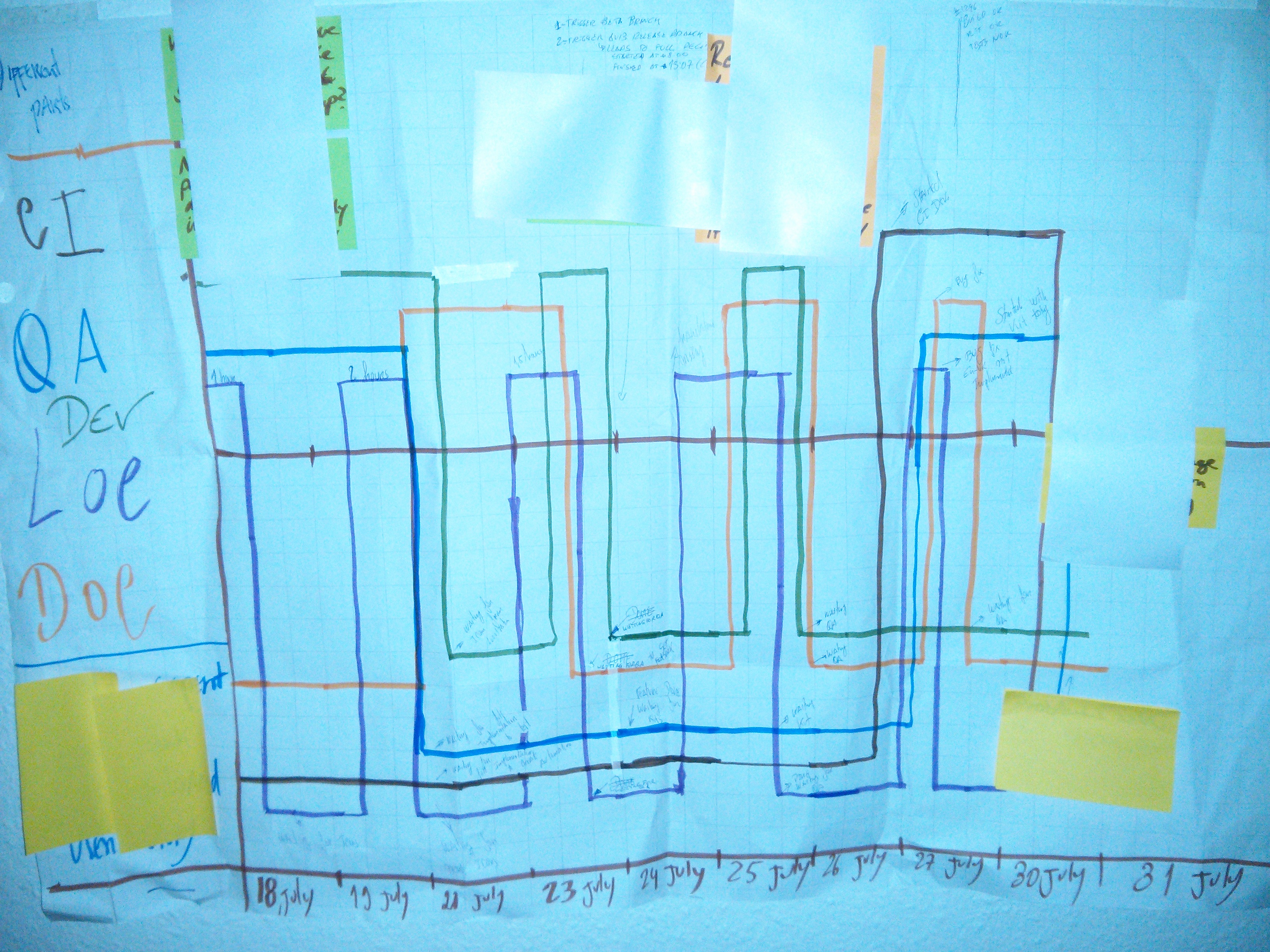 The easiest way to do this is to grab some flip-chart papers and tape them on the wall. Then divide the space in equal intervals, each interval represents a day of the iteration. Draw a line on the Y axis, this line should be on the position Y=0. You should have a flip-chart for each different story of the iteration. If your team is not co-located there is no problem, just create an excel for the same effect.
During development, the team should be concentrated on one story at a time. If they are doing any activity that will bring value to a customer, each member draws a line on top of the Y axis line. If they are waiting, blocked or doing some activity that does not bring value to the customer,draw a line under the Y axis line.
If you are new to this exercise, as a rule of thumb, you can think that all tasks that are needed to accomplish a story, bring value to customer. All other tasks bring a waste. As it is used in a business world, customer value is an amount of benefit that a customer will get from a service or product relative to its cost. Waste as Poppendiecks describes in their book “Lean Software Development” is:
- Anything that does not create value for a customer
- A Part that is sitting around waiting to be used
- Making something that is not immediately needed
- Motion
- Transportation
- Waiting
- Any extra processing steps
- Defects
If a team is extremely mature you can start thinking that all QA activities that are performed as validation instead of part of development or bug fix, should be considered a waste. As an example, Unit Testing, TDD, ATDD and some other techniques can be considered QA activities as a part of development. If we do a testing at the end just to validate that everything is fine, then you can think this is a waste. Bug fixing can be considered as a waste too. With this statement, I am expecting to get lot of reactions :D
The team needs to do this activity everyday in order to track all different activities inside the team. Do not forget to write notes when people are blocked or in IDLE; these notes are important to be discussed in the retrospective. The possible result can be something as the picture seen above. Like I said I tried this activity several times and its amazing how much information team gets out of this exercise. For me this is one of the exercises from my toolbox that I more appreciate.
What do you think about this exercise? Do you think it could be useful for your and for your team? Leave me some feedback in order to make improvements.
On my next blog post I explain how to use the “Team Assessment Survey” exercise to run a retrospective.
Did you like this post? Do you want to get more in the future? Subscribe my newsletter below and follow me on twitter: @lgoncalves1979.
I am trying to improve these blog posts with a help from professional designers and editors to give you even more valuable content. If you want to support me on this effort, feel free to contribute with any amount of money that you think it´s fair.
Thanks guys,
Luis
Getting Value out of Agile Retrospectives: “StarFish”
In this post, I will explain the exercise called “StarFish”. This exercise can be found in the book: “Getting Value out of Agile Retrospectives”, a book written by me and Ben Linders with the foreword from Esther Derby. The book can be downloaded by free in LeanPub.com or InfoQ.com, please download it and spread it within your colleagues.
Here you can find my previous blog “Getting Value out of Agile Retrospectives: “Happiness Index”".
What can you expect to get out of this technique
Starfish exercise is an evolution of the typical three questions that are used for retrospectives:
- What went well
- What did not go so well
- What will be improved
Instead of the typical three questions we have a circle with five words:
- Stop - These are the activities that do not bring value to a team or to a customer. Activities that bring waste into the process.
- Less - These are activities where an effort required to perform such activities is much smaller than a benefit. Or the activities that were brought into the team in past but did not show any overall improvements to a process.
- Keep - Usually these are good activities or practices that team members want to keep. These activities are already being applied.
- More - Activities on which a team should focus better, perform more often. For example, many teams tell me how pair programming is good,yet they do not do it every time they should.
- Start - Activities or ideas that a team wants to bring into the game.
With this exercise, teams can get a good overall picture of what’s going on within the team, what is working and what is not. They can get an overview about failed as well as successful work experiences in past. In my personal opinion, I think this is a great evolution of the typical three questions.
When you would use this technique
I believe this technique is quite simple and does not require any special occasion. Although, it might be interesting for situations when a team went through several ups and downs during the iteration. This technique reveals all good things and less positive things performed by a team. Therefore, this might be a good tool to make a summary of the sprint.
StarFish is suitable for any team, it does not require any specific level of maturity.
How to do it
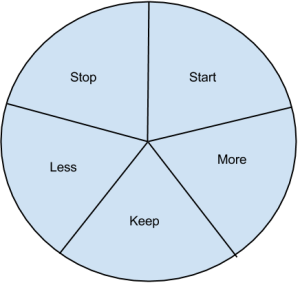 This retrospective is quite simple. First we draw something like what is shown on the picture in a flip chart. One of the beauties of this exercise is the fact that collocation of a team is not mandatory. You can use, for example, tools like Lino to apply the exercise on non-collocated teams. This tool allows us to do everything what we need in order to run this exercise.
After having the picture on a flip chart, it´s good to start a brain storming session with a team allowing them to dump their ideas in the “Stop” area. After that, give 2-3 minutes to each person to read out loud its “stop” ideas. Afterwards, spend 10 minutes for a short discussion to see if everyone is aligned.
Repeat the exercise for each different parts: “Less”, “Keep” and “More”.
For the “Start” part, add one extra step and use Toyota approach choosing one single topic to “Start”. I would go for votes and see what is the most important topic that one should start with. After selecting the topic, design a small strategy to make sure a topic is well implemented. This strategy might include responsible persons, due date and most important success criteria. In order to know if the implementation was successful or not, we must have a success criteria.
I would like to highlight that a theme that is chosen in the “Start” part, does not need to be a new topic for a team, it can be an improvement of something that is not working well within the team.
Another important thing that I think it´s worth to mention, is the order of different “words” in the circle. I really like to start with: “Stop”, “Less”, “Keep”, “More” and finish with “Start”. I think this has a big impact. Starting with negatives topics and progressing little by little towards the positive ones will help the team to end the retrospective with a much more positive feeling than if they did it in a random order.
I honestly think this exercise is really nice, but I really would love to get your feedback. Please comment on this and let me know your opinion.
On my next blog post I explain how to use the “Value Stream Mapping” exercise to run a retrospective.
Did you like this post? Do you want to get more in the future? Subscribe my newsletter below and follow me on twitter: @lgoncalves1979.
I am trying to improve these blog posts with a help from professional designers and editors to give you even more valuable content. If you want to support me on this effort, feel free to contribute with any amount of money that you think it´s fair.
Thanks guys,
Luis
Getting Value out of Agile Retrospectives: “Happiness Index”
In this post, I will explain the exercise “Happiness Index”. This exercise can be found in the book: “Getting Value out of Agile Retrospectives”, a book written by me and Ben Linders with the foreword from Esther Derby. The book can be downloaded by free in LeanPub.com or InfoQ.com, please download it and spread it within your colleagues.
This exercise is a combination of “Develop a time line” and “Emotions Seismograph” from Norman L. Kerth.
What can you expect to get out of this technique
The purpose of this exercise is to draw a graphic representation of team members´ emotions during sprints, connecting their emotions to sprint events. With this kind of information, the team can identify what exactly affects its performance during the sprint. For example, if they have some problems with the build server, most probably the mood will drop because of the team frustration not being able to proceed with the work. This kind of exercise is a great way to represent team emotions within the sprint.
When you would use this technique
I believe this technique is quite simple and does not require any special occasion. Although, it might be suitable for situations when a team has many different emotions within the sprint and they wish to analyse the consequences, or when the team has several challenges within the sprint and would like to understand better when and how the issues appeared.
Happiness Index is suitable for any team, it does not require any specific level of maturity.
How to do it
To perform this exercise, you simply need a A4 white sheet and some post-it notes. Start by dividing the sheet in two parts, having positive and negative axis. After, divide the X axis in the number of days that your sprint has.
There are two ways of doing this exercise:
1) The exercise is done within the retrospective itself with all the team
2) The exercise is done in small pieces during the sprint
Let´s start with the first option, create small groups of 2 or 3 persons. Ask them to do a small brainstorming session and let them think about all the events that occurred during the sprint. Afterwards, ask them to create a graphic showing emotion levels with events occurred during the sprint. When all groups are done, create a representation of all small groups in a single graphic. Do not forget to put an explanation of each different emotion.
For the second option, instead of the team drawing the graphic in the retrospective, each person will draw his own emotion level at the end of each work day. This approach will make sure that all events are covered and not forgotten.
Using one way or another, we will have a fantastic picture of what happened during the sprint. With this kind of information, a facilitator can help the team to identify events that should be repeated and events that cause delay in the team. The root of problems can be found using normal root cause analyses techniques.
With the right imagination, this exercise can be applied to remote teams as well. Being collocated is not a requirement to run this exercise.
What do you think about this exercise? Do you think this would be a good retrospective exercise for our new book? To find more information about the book, check my post here.
On my next blog post I explain how to use the “Star Fish” exercise to run a retrospective.
Please leave your comments, all your comments and ideas will help me to improve the exercise and the book.
Did you like this post? Do you want to get more in the future? Subscribe my newsletter below and follow me on twitter: @lgoncalves1979.
I am trying to improve these blog posts with a help from professional designers and editors to give you even more valuable content. If you want to support me on this effort, feel free to contribute with any amount of money that you think it´s fair.
Thanks guys,
Luis
Getting Value out of Agile Retrospectives
Hi guys, I want to use this post to introduce a topic I will discuss during next few weeks. Me and my colleague Ben Linders we are writing a pocket book about retrospectives. The title of this book is: “Getting Value out of Agile Retrospectives“.
The main target are: Agile coaches, scrum masters, project or product managers or facilitators who have at least some experience with doing retrospectives. They know the purpose of them, how they fit into agile / scrum, and how to arrange and perform them. This book will deliver practical description of retrospectives and how to do them, as well as an inspiration to different retrospective techniques and good practices in doing them.
Based on the previous information I want to use this blog to get a feedback from you. During following weeks I will publish several posts that will cover retrospective exercises and I would like to get some comments which would enable me to improve a content for the final version.
Below you can find some of the exercises that will be part of the book(Ben’s exercises are not here).
- Happiness Index
- Star Fish
- Value Stream Mapping
- Team Assessment Survey
- Brand Car
- Constellation
- High Performance Tree from Lyssa Adkins
- Boat
- Awesomeness Definition
- Amazon Review
In conclusion, I would like to ask you to leave as much feedback as possible so that I can improve the outcome of this book.
Did you like this post? Do you want to get more in the future? Subscribe my newsletter below and follow me on twitter: @lgoncalves1979.
I am trying to improve these blog posts with a help from professional designers and editors to give you even more valuable content. If you want to support me on this effort, feel free to contribute with any amount of money that you think it´s fair.
Thanks guys,
Luis
Ping Pong Programming
 Hi guys, in my last post I gave a small introduction to pair programming. This post will be short where I would like to present a small technique that can be used during pair programming. I learnt this in Rachel’s and Liz’s book. This technique is called Ping Pong Programming and it ensures that both members of the pair take a turn at the keyboard. Below you can find the steps.
What do you think about this approach? Do you think that would help your developers? Do you think it would help you guys to design a better code and to spread knowledge within a team?
Please leave some comments.
Did you like this post? Do you want to get more in the future? Subscribe my newsletter below and follow me on twitter: @lgoncalves1979.
I am trying to improve these blog posts with a help from professional designers and editors to give you even more valuable content. If you want to support me on this effort, feel free to contribute with any amount of money that you think it´s fair.
Thanks guys,
Luis
Small intro to “Pair Programming”
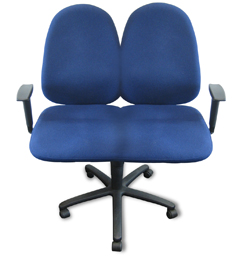
Hi guys, some of teams, that I have been helping lately, identified a lack of knowledge as a problem in some parts of our product. To tackle this issue, they decided to start with “Pair Programming”. Previously, they never did it so they asked me for some guidance where and how to start. That´s why I am writing a small intro to a “Pair Programming”.
As Rachel and Liz said in their book: “Pair programming is two people working together- at the same computer, solving the same problem. Each person plays an active role in creating the software; the person actively typing is known as the driver, and her/his partner is the navigator who looks ahead to consider next steps and potential pitfalls. Pairs swap fluidly between these roles.”
If your team adopts “Pair Programming”, these are some of the advantages that you will benefit from:
But what should be done during the Pair Programming session?
First, when you are driving, demonstrate that an important aspect of pair programming is explaining what you are doing and why, so don´t just type code in silence.
Second, stay open for suggestions from your pair, even if they are novice programmers. Even though you see a very obvious solution, be willing to try the solution that your pair suggests. In any case, both will learn. If the solution of your pair is wrong, he/she will learn why it is wrong with a help of your explanation. If the solution is good, then you will learn new aspects with your novice colleague :).
Third, one person shouldn´t use the keyboard for more than ten minutes at a time. Using ping pong programming can be a good approach. More information about ping pong programming here.
One big mistake that is common in “Pair programming” is the fact that only one person does all the job. A lot of interaction between pairs should be observed. Interactive pairing forces pairs moving keyboard back and forward several times. In the beginning pair programming can be frustrating. Most of the time it means that developers will slow down to help colleagues but on the long term this is a tremendous help for the team itself.
This was a brief introduction to the “Pair Programming” . Naturally, this post itself is not enough but at least gives an idea about what “Pair Programming” is. If you want to know more resources about pair programming, just let me know.
Did you like this post? Do you want to get more in the future? Subscribe my newsletter below and follow me on twitter: @lgoncalves1979.
I am trying to improve these blog posts with a help from professional designers and editors to give you even more valuable content. If you want to support me on this effort, feel free to contribute with any amount of money that you think it´s fair.
Thanks guys,
Luis
Small intro to “Coding Dojo”
Hi guys,at the company, where I currently work, we are ramping up several Communities of Practices and one of the activities we want to introduce is “Coding Dojos”. This is the topic for today´s blog.
A Coding Dojo is an activity that brings developers together to work in a pre-selected programming challenge. This is a great way for developers to improve their skills and it´s a great activity to encourage learning between developers.
Everything starts with a pre-selection of a coding challenge which helps the people to prepare better for the activity. The dojo runs with two developers working in a pair in front of a computer solving the coding challenge. This can span different topics. For example, re-factoring some part of the code, implement a new architecture, etc. The PC will be connected into a projector in order to share their work with the rest of the room/office.
During the development task, developers talk aloud giving an explanation to others about tasks and their solutions. If the room cannot follow what is being said, the developers will explain once again until they understand the approach taken by the pair.
In every five minutes one half of the pair changes a seat with someone else in the room. This will allow everyone in the room to participate in this activity. Usually this exercise lasts for 1 hour.
I believe this is a great way to help team members sharing the knowledge among each other.
What do you think about this activity?
Did you like this post? Do you want to get more in the future? Subscribe my newsletter below and follow me on twitter: @lgoncalves1979.
I am trying to improve these blog posts with a help from professional designers and editors to give you even more valuable content. If you want to support me on this effort, feel free to contribute with any amount of money that you think it´s fair.
Thanks guys,
Luis
How to build agreement within your team
Hi guys, in this post I want to demonstrate a small exercise that I learned from the book “Facilitator’s Guide to Participatory Decision-Making” by Sam Kaner.
As an agile coach I spend lot of time introducing new ideas to teams but a question is: ” How can I figure out if these ideas will have enough buy-in from teams to be implemented?” The exercise that I´m showing you today will solve this problem; the exercise is called “Gradient of Agreement”.
The exercise is really easy. Use a flip-chart, draw fiver different levels of agreement: “Endorse”, “Agree with reservations”, “Mixed feelings”, “Disagree but go with the majority” and “Block”. Ask team members to put a check mark on the level they feel comfortable, as presented below in the example.
Using this kind of tool allows everyone to reveal its own opinion and level of commitment to the proposed approach. Sometimes it is not possible to get buy-in from the team, therefore I propose that you start with small steps, instead of having an ambitious final solution. Why not break the solution in small pieces, for example, instead of proposing to the team that automated tests should run after every check in, split this ambitious goal into smaller ones:
- Automated tests should run automatically after every checkin
- Automated tests should run manually after every checkin
- Automated tests should run automatically every night
- Automated tests should run manually every night
And use the same technique for each different goal. After that chose the one that has the right balance between an ambition and agreement from the team.
This was the exercise that I wanted to bring up today.
Did you like this post? Do you want to get more in the future? Subscribe my newsletter below and follow me on twitter: @lgoncalves1979.
I am trying to improve these blog posts with a help from professional designers and editors to give you even more valuable content. If you want to support me on this effort, feel free to contribute with any amount of money that you think it´s fair.
Thanks guys,
Luis
Rules to design good Unit Tests
Hi guys, this post will be short but in my opinion it is really useful for agile developers. Some weeks ago, when I was reading the book “Agile Coaching” by Rachel Davies and Liz Sedley, I found an interesting part that I wanted to share: “Unit tests Rules” by Michael Feathers.
Michael Feathers tells us that a test is not the unit test if:
- it talks to the database
- it communicates across the network
- it touches the file system
- it can´t run correctly at the same time as any of your other unit test
- you have to do special things to your environment (such as editing config files) to run it
He also tells us that tests which do these kind of things are not bad tests. Most of times, it is necessary to have these kind of tests, however, it´s important to separate them from true Unit Test so that we can keep a set of tests that we can run fast whenever we make changes.
This is a short pillar I wanted to share with you.
Did you like this post? Do you want to get more in the future? Subscribe my newsletter below and follow me on twitter: @lgoncalves1979.
I am trying to improve these blog posts with a help from professional designers and editors to give you even more valuable content. If you want to support me on this effort, feel free to contribute with any amount of money that you think it´s fair.
Thanks guys,
Luis
 D5 Creation